
WeHunt uses icons throughout the app to show status, quick controls, and actions. This article explains what each one does, organized by where you find them.
Dog info panel
When you tap on a dog in WeHunt, the dog info panel opens with the icons below.
Status row
 | Barking time | How long the dog has been barking on the currently visible trail, shown in minutes. |
 | Distance to dog | The straight-line distance from your current position to the dog. This does not account for terrain or obstacles in between. |
 | Satellites | GPS satellite signal quality for the collar. |
 | Mobile signal | Mobile network signal strength at the collar's location. |
 | Battery | The tracking collar's current battery level. |
 | Owner | The user who owns this device. |
Quick controls
 | Reset trail | Clears the dog's trail from the map and starts drawing it fresh. |
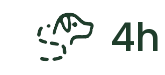 | Trail length | How much trail history is shown on the map (for example, the last 4 hours). Tap to change. |
 | Tracking interval | How often the collar reports its position (for example, every 5 seconds). A shorter interval gives more up-to-date positions but uses more collar battery and mobile data. |
Actions
 | Navigate to dog | Opens navigation/bearing towards the dog's current position. |
 | Analysis of trail | Select two points on the trail to see detailed data between them. |
 | Whistle | Sends a sound/beeper command to the collar. |
 | Light | Activates the collar's LED light. |
 | Replay | Plays back the dog's last recorded sound clip. |
 | Settings | Opens device settings: tracking interval, bark sensitivity, antenna, nickname, and administrators. |
 | More | Additional actions for the dog/device. |