
General info
In which countries does the device work?
The device works in Europe in countries that have some of the 2G, 4G, NB-IoT / LTE-CAT M1 network available.
How weather resistent is Artemis?
The device has IP67 rating of which is an international standard (IEC 60529)
It measures a device's resistance to dust and water:
6 = dust-tight (completely protected from dust and other solid particles from entering inside casing)
7 = waterproof if submerged in fresh water up to 1 meter of depth for 30 min. without sustaining damage.
Device Operation and Troubleshooting
Why is my odometer displaying 0 even when the dog is moving?
The dog must move at least 50 meters for the odometer to update.
If the dog stays within 50 meters radius, the odometer will not update.
How can I do a forced restart for Artemis, in case if it is not responding or switching power on/off doesn't work?
- Attach Artemis to its power charger
- While attached to the charger, keep the ON/OFF power switch pressed for 1sec
- Then release the ON/OFF power switch
- Once Artemis has restarted, test how it works
Why the device is not registering that the dog is barking?
The bark counter is working, but external conditions may affect its accuracy. In some cases, it may show too many barks, fail to register barks at all, and then it might require adjustments to the bark sensitivity throughout the day as conditions change. We are constantly conducting research and testing to improve the functionality of the bark detection
What can I do if barks are not detected correctly?
- Check that the collar is not too tight around the dog's neck
- Test if Artemis can record a sound sample? (is microphone OK?)
- If device's microphone is OK -> Adjust the bark detection sensitivity
- If used with a vest/harness -> Set bark detection to the most sensitive
- If barking is detected correctly when using Artemis on other dogs, but not when using it with a specific dog, you can record the dog barking and send the audio sample to our technical support, who can forward it to our R&D department for further investigation.
Why is my device experiencing cutouts in device's network connection?
If network reception suddenly drops, the device usually automatically recovers within 10 minutes.
This is a subject of ongoing research and development.
If the network is temporarily unavailable or the network is too weak, we cannot control such external conditions.
But we can improve the device's performance in such conditions.
What can I do If the cutout in device's data connection lasts longer than 10 minutes?
You can open device's settings menu in WeHunt App and test if some of the other antenna options work better:
1. Only internal antenna 2G/GSM, 2. internal antenna 4G/LTE, 3. external antenna 2G/GSM, 4. external antenna 4G/LTE
If e.g. only internal antenna works, then the external antenna might be broken or not fastened securely to the device
Why 10 minute interruptions in internet connection are still considered within normal use of the device?
E.g. if the antenna selected for use was external 4G/LTE, the device will perform the following actions:
1. It searches preferred network with External antenna (e.g. LTE Cat.M1). If unsuccessful:
2. It searches secondary network with External antenna (e.g. 2G/GSM). If unsuccessful:
3. It tries again the preferred network with External antenna. If unsuccessful:
4. It it tries Nb-IoT network with External antenna
5. This all takes about 10 minutes!
6. It no success with the Nb-IoT with External antenna, the device restarts the process and repeats the steps 1-4.
7. If the external antenna is broken, then the internal antenna is the one that will be used with the available network.
8. If the local network reception is poor, this process may be restarted several times, even if both antennas are otherwise fine.
What can I do if Artemis doesn't give location updates?
- Check that the subscription needed to use the device is OK
- From the Artemis' own settings menu, select: "Restart the device"
- From the Artemis' own settings menu, test available antenna options
- Use 15sec or faster tracking frequency, since they don't use powersaving
- Check if device has external damage to be seen when visually examined
- If others are following the device, do they get location updates OK?
- If others get location updates OK, but You don't, then check App's subscription, App updates, network connection etc.
Charging and Battery Maintenance
Why Tracker Artemis starts sometimes when connected to charger?
Due to the precaution measure in order to prevent the device from unplanned shutdown in some cases, such as:
- In case of a sudden run-out of power when the battery voltage drops in cold weather and poor coverage
- Or if the last operating state cannot be read from memory when power is switched On to the device
- If charging connector disconnects at the initial phases of charging (poor contact, or connector not securely in place)
- If the device stays On although the charger is disconnected, use the switch and turn it off manually
Why do I need to charge the device battery every three months?
All devices discharge battery to some extent, even when not in use. It is recommended to charge the battery every three months to avoid deep discharging of the battery. If the battery is not charged every three months, the battery may be damaged, and the warranty will not cover damage caused by misuse of the device.
What can be done if Artemis' battery is not charging?
- If it is possible to test with another known-to-work-ok charger for Artemis, that would rule out charger/cable issues.
- Try different wall socket and check externally if there's any dirt / rubbish etc gone inside the charger's charging plug.
- Check for debris, dirt or damaged / warped pin under the Artemis' charging cover
- If the battery charge % is not displayed correctly, the device may be used, but can only be fixed by sending it to Service
How long does it take to fully charge Artemis' battery?
Note! It usually takes 6-8 hours to fully charge an Artemis battery
If the battery is completely discharged, and no LED-lights lit at all:
- Charge the device for 2 hours and then disconnect for a while and plug it in again.
- Then the LED-lights should be lit normally and charging continues OK
How the selected tracking interval affects on power consumption?
- Tracking frequency 3sec -> battery lasts on average 19h
- Tracking frequency 20sec -> battery lasts on average 1 day 20h
- Tracking frequency 1min -> battery lasts on average 2 days 15h
- Tracking frequency 2min -> battery lasts on average 3 days 6h
Differences in outdoor temperature also affect power consumption
Device increases power usage in areas of weak network reception
Device Usage and Compatibility
Can I change the collar for the device myself?
Yes, you can change the collar yourself.
Can I use Artemis with harnesses or vests?
Yes, you can use Tracker Artemis with vest.
What applications does the device support?
You can use the device with the WeHunt application
Can I change the SIM-card of the device?
You cannot change the SIM-card of your device yourself.
If you open the device, the warranty will expire immediately.
How do I get an audio sample from the Artemis collar?
If the device location updates without problems (data connection is OK), open the device information menu at the bottom of the map view in the WeHunt App and start recording an audio sample (up to 20 seconds) by using the corresponding button
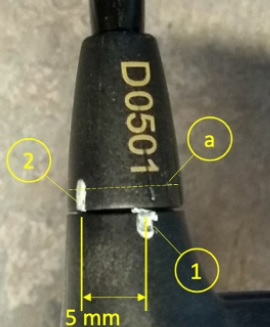
How do I change the Artemis antenna or tighten it if necessary?
1. Tighten by hand and mark the tightening point with a line across the joint (white line in the picture below)
2. Tighten a further 5mm, eg with locking pliers, holding point (a) and a apply sufficient torque of approx. 60 cNm
Device Warranty
What if the malfunction is severe or the device doesn't work at all?
- Switch off the device by pressing the power button
- Wait approx. 10 minutes
- Then switch the power On, and test if the device now works OK
- If there's visible external damage, the watertightness might be compromised: Send the device to Service
- If no LED-lights visible and device does not respond at all -> Connect to a charger for 6 hours
- Then turn on the power normally and test if the device now works OK
- If the problem still persists and the device still doesn't work as it should -> Send the device to Service
How long is the warranty on the Tracker Artemis?
The device has a two-year warranty. You can check the warranty conditions in the warranty booklet that came with your device.
How can I send the device to warranty service?
To service the device, You have to send first a service request. In response to the service request you sent, you will receive more detailed instructions to Your email of how to send the device for service